
Synology rx418 expansion unit 4bay rack station
    Synology

    Synology rx418 expansion unit 4bay rack station

    Referencia: RX418
    553,55 €
    Impuestos excluidos
    Almacenamiento en red - Almacenamiento Armario - Synology - Synology rx418 expansion unit 4bay rack station
    Guía de Tallas
    Guía de Tallas
    CLOTHES
    MEASUREXS/34S/36M/38-40L/40-42
    UK681012
    USA46810
    FRA36384042
    Waist (cm)64687276
    Chest (cm)81858993
    Seat (cm)899397101
    Inseam (cm)81828384


    SHOES
    FOOT IN INCHESFOOT IN CMUSAEuroUK
    23.56395
    24.16.539.55.5
    24.87.5406
    1025.48417
    10¼25.78.541.57.5
    10½269428
    10¾27.39.542.59.5

    How to Take Clothing Measurements

    1. Get a flexible measuring tape. These are often sold in craft stores
    2. Neck:
      • Measure around the base of the neck in inches.
      • Round up to the nearest half inch.
    3. Chest:
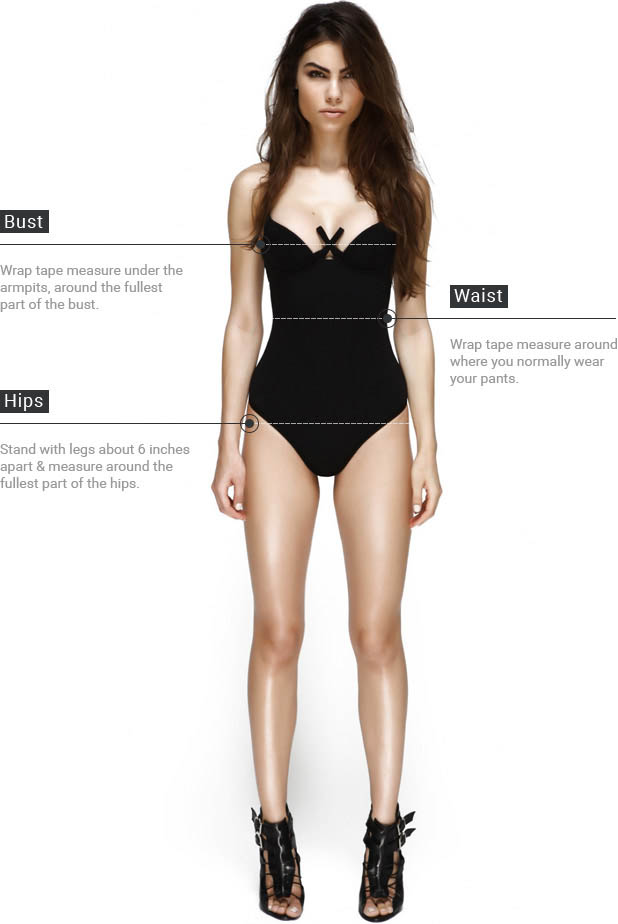
      • Wrap tape measure under armpits around fullest part of chest (usually right above nipples
    4. Sleeve:
      • Bend your elbow and rest your hand on your hip.
      • Have someone measure from the middle of the back of your neck to your wrist by putting the tape measure over your shoulder, around your elbow and to your wrist.
    5. Waist:
      • Wrap tape measure around where you normally wear your pants. Keep tape measure a little loose by keeping a finger between the tape measure and your waist.
    6. Inseam:
      • Put on a pair of shoes.Have someone measure from your crotch to back of the heel, where you want your pants to end.
    7. Hands:
      • Measure around the hand at the fullest part (exclude thumb). The number of inches shows the size of the glove.
    Cantidad
      Últimas unidades en stock

      Security policy

    (edit with the Customer Reassurance module)

      Delivery policy

    (edit with the Customer Reassurance module)

      Return policy

    (edit with the Customer Reassurance module)


    MarcaSynology
    ModeloRX418
    CaracteristicasModelos compatibles
    - RS1219+
    - RS818(RP)+
    - RS815(RP)+
    - RS816
    - RS815
    Almacenamiento
    - Receptáculo(s) de unidad: 4
    - Tipo de unidad compatible:
      3.5" SATA HDD
      2.5" SATA HDD
      2.5" SATA SSD
    - Capacidad máxima bruta interna: 48 TB (unidad de disco duro de 12 TB x 4) (la capacidad puede variar según el tipo de RAID)
    - Unidad de intercambio en caliente
    - Gestión de RAID a través de Synology DSM
    Puertos externos
    - eSATA port: 1
    Apariencia
    - Tamaño (Altura x Anchura x Profundidad): 44 mm x 480 mm x 325 mm
    - Peso: 4.28 kg
    Alimentación
    - Recuperación de energía: Sincronizado con Synology DiskStation
    - Fuente / Adaptador de alimentación: 100W
    - Voltaje de alimentación de entrada CA: De 100V a 240V CA
    - Frecuencia de alimentación: 50/60 Hz, Monofásico
    - Consumo de energía: 23.26 W (Acceso)
      6.39 W (Hibernación de la unidad de disco duro)
    Temperatura
    - Temperatura operativa: De 5°C a 35°C
    - Temperatura de almacenamiento: De -20°C a 60°C
    - Humedad relativa: De 5% a 95% HR
    Certificación
    - FCC
    - CE
    - BSMI
    - EAC
    - VCCI
    - RCM
    - KC
    Otros
    - Ventilador del sistema: 40 mm x 40 mm x 3 pcs
    - Fácil sustitución de ventilador del sistema:
      Nivel de ruido: 25.1 dB(A)
    Contenido
    - Unidad principal x 1
    - Guía de usuario x 1
    - Paquete de accesorios x 1
    - Cable de alimentación CA x 1
    - Cable de expansión: eSATA x 1
    Fecha de revisión11-09-2018 por MSB

    Detalle de productos

    1 Artículo

    Referencias Específicas

    ean13
    4711174722983
    Nuovo

    Comparación rápida

    Producto
    Synology rx418 expansion unit 4bay rack station Synology rx418 expansion unit 4bay rack station
    Availability
    Precio
    553,55 €
    Descripción
    Almacenamiento en red - Almacenamiento Armario - Synology - Synology rx418 expansion unit 4bay rack station
    No hay características para comparar

    No hay productos seleccionados para comparar

    Facebook Comments is not configured